
Please note: When a buyer supports your Bookle Store, they become your customer to engage with and follow up as needed. Bookle Admin plays only a supportive, secondary role.
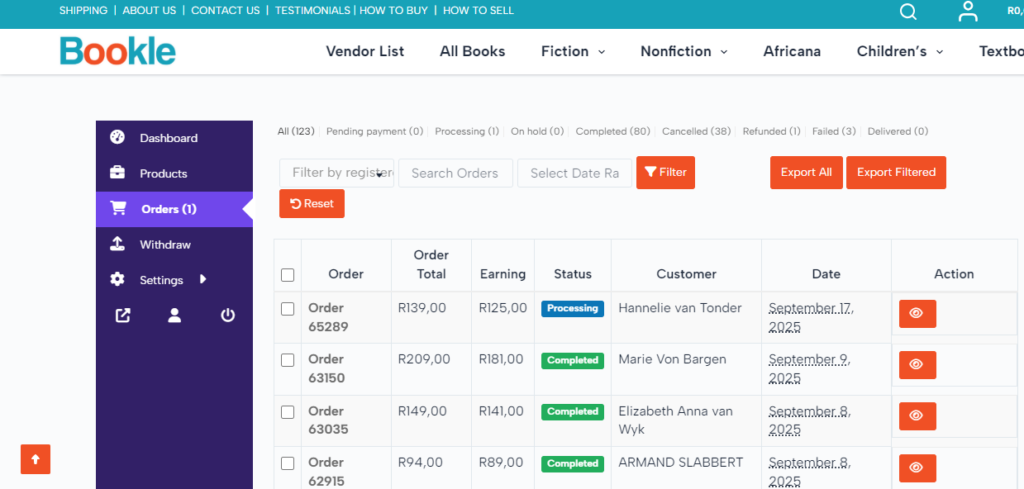
- All your orders can be viewed when you visit the seller dashboard
- When you receive a new order, you’ll get a New Order email containing all order details, including the buyer’s selected delivery option—whether a Pudo locker location or a direct delivery address. Be sure to check which delivery method the buyer chose.
- The order status should show as Processing.
- Click on the order number to open the order. On the right-hand side, you should see a notification from TradeSafe confirming payment from the buyer.
- Dispatch the parcel via Pudo as per the buyer’s order. Click here to find out How Pudo works. And click here for Pudo’s sizes and prices. Our prices accommodate the medium-sized lockers. You may book a smaller locker if the parcel fits comfortably and won’t be damaged.
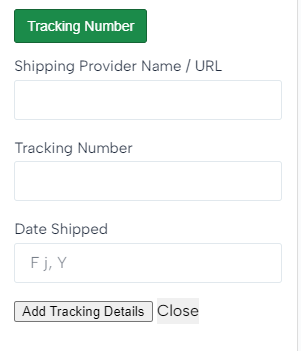
- IMPORTANT: Click the green Tracking Number button, fill in the required fields, including the following Pudo tracking link in the Shipping Provider Name / URL field: https://customer.pudo.co.za/track, and select Add Tracking Details to send the tracking number to the buyer via automated email.
- If Pudo notifies you that the parcel has been delivered, please forward this confirmation message to Bookle Admin via email or WhatsApp. Bookle Admin will then update the order status on your behalf.
Note: Failing to log tracking numbers promptly may delay your payment from TradeSafe. - Once the status is updated to show that the buyer has received the package, the buyer has 24 hours to either accept or decline the book(s) through an email sent by TradeSafe.
- If the buyer accepts, TradeSafe will release the payment to you.
- If there is no response within 24 hours, TradeSafe will automatically release the funds.
- If the buyer declines, you and the buyer will need to negotiate a resolution directly. More information on this process is available here.
- When the buyer accepts the book(s), the order status will automatically change to Completed. You will receive an email confirming the order completion.